While it does feel like the prevalence of RSS has faded somewhat since the heyday of Google Reader, I find that most sites that I care about still maintain an RSS feed. It is sometimes buried in the HTML, or must simply be guessed at by appending .atom or something to the end of the URL, but it is there. But, there are a few recalcitrant websites that don’t offer it, and for these we have to whip out the big guns: web scraping. Today’s topic: XPath queries in FreshRSS.
Dan Q has an excellent article on doing exactly this over on his blog [1], and I encourage you to go read his post. I’ll cover the basics of XPath through examples and then show how to test XPath queries before using them with FreshRSS, as the browser context differs somewhat from the FreshRSS context when fetching content from websites.
This article assumes some familiarity with command line tools and Linux.
A Caveat
Web scraping has acquired a bad reputation (mostly) because of AI companies doing it at scale, gobbling up each and every site without any restraint or respect for the owner of the site. While scraping can be a healthy part of the Internet, a minimum of decorum is required [2]. I would suggest the following guidelines:
- scrape from your own IP address, don’t use shady proxy services;
- when possible, identify that you are scraping for the purposes of generating an RSS feed, ideally through the
User-Agentstring (this is the default behaviour in FreshRSS); - scrape at a reasonable interval, no more than a few times a day.
Obviously the frequency will depend on the website, so exercise some common sense.
With that addressed, let’s go on using XPath to get RSS feeds!
A Failing Scraper
A few weeks back, I noticed that my feed of Paul Graham’s essays was failing. Unfortunately, it looks like Aaron Swartz’ custom-made scraper has recently stopped working1. Even though an enterprising individual (along with ChatGPT’s help) managed to publish a new scraper, we shall endeavour to create one using only XPath today.
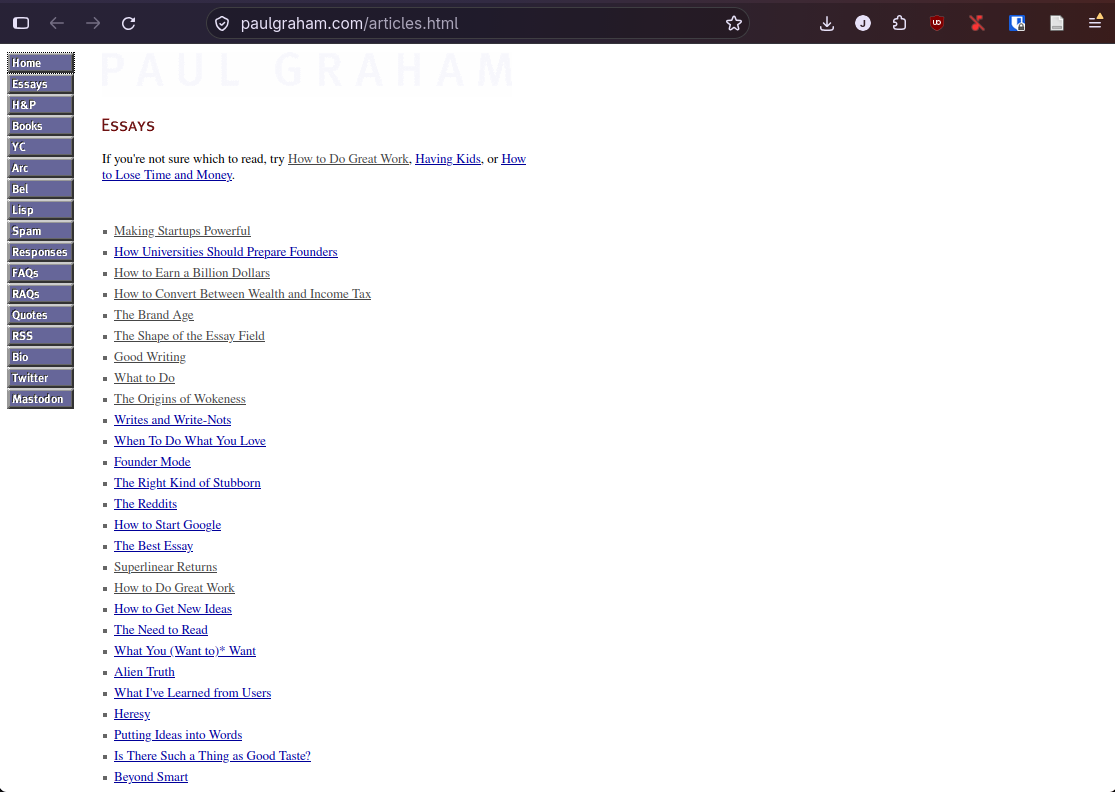
Paul’s website is, compared to most modern websites, relatively simple (see Fig. 1). It’s basically just a bunch of tables nested together and some list elements. From the XPath perspective, this leaves us with very little structure to work with. There are no CSS classes that we can use to easily filter out links to new essays, no metadata present to populate the date of publication, post ID, author, etc. On the flip side, its static nature makes it trivially easy to hard-code the exact table elements that we are looking for.
How can we use XPath to find these elements? And how can FreshRSS use this to build an RSS feed?
XPath crash course
XPath is a query and expression language that allows us to navigate nodes and attributes in XML and HTML documents (and their tree representation, known as DOM). It is an important part of the XSLT standard and of the overall early web standardization. It stands for XML Path Language and it is supported by all major browsers today.
There are multiple versions of XPath: 1.0, 2.0, 3.0, and 3.1. The only well-supported version is XPath 1.0, and that’s what FreshRSS uses, through libxml2, so we’ll focus on 1.0 today. This is rather unfortunate, as many power primitives were added in 2.0.
How does XPath allow us to navigate/traverse nodes in the DOM? Better to start with an example: open up the browser console in your favourite browser and follow along. Going back to Paul’s Essays page, Firefox tells me (through the “Copy –> XPath function) that the “Essays” image can be accessed through the following XPath expression2:
/html/body/table/tbody/tr/td[3]/table[1]/tbody/tr/td/img
Neat! But what I’d really like to do as a scraper is to extract information relative to that anchor. For example, I’d like to extract the text right below it. Going over to the console and asking for the XPath expression that selects it, we get:
/html/body/table/tbody/tr/td[3]/table[1]/tbody/tr/td/font
The prefix matches all the way to the exact node, font, that we care about. We are thus looking for the *following sibling” of that element. To find this, let’s use an XPath axis to select the following sibling of the Essays heading:
/html/body/table/tbody/tr/td[3]/table[1]/tbody/tr/td/img/following-sibling::font
We’re directly addressing a node pretty deep in the DOM, and this is pretty fickle. What if a new row was added to the outer table that serves as the layout of the main page? An extra table at the top?
There is a way in XPath to select nodes that match a given node path starting from anywhere in the DOM rather than at the root: //. To use it properly here, though, I need to introduce predicates. As the name implies, this allows to select nodes that have specific attributes. Looking at the “Essays” graphic, we can see that it has the attribute alt="Essays". This is unlikely to be repeated by other elements on the page, so let’s use that to refer to our initial img element. We want to ask, what is the font following the one containing an image that has the alt attribute set to "Essays"? Let’s write this as XPath:
//img[@alt="Essays"]/following-sibling::font
Now that is legible! We have all the ingredients to go through Paul’s website and generate a feed from it using XPath.
HTML digging
Let’s look at Paul’s website again, but with a focus on getting a full list of articles. We can notice two things upfront:
- there’s a big nice “Essays” heading that could possibly be used as an anchor;
- new essays are just elements of a list.
Let’s start with the anchor. Recall that selecting the big “Essays” element can be done with:
//table/tbody/tr/td[3]/table[1]/tbody/tr/td/img
(Yes we’re taking a step back and not using the predicate, bear with me.) Now let’s look at the items that we are actually interested in, the list of essays, and ask Firefox to give us the XPath of the first article of the bunch:
//table/tbody/tr/td[3]/table[2]/tbody/tr[2]/td/font
Comparing the XPath prefixes, we see that the table containing our list (table[2]) is actually the one right after the table containing the Essays graphic (table[1]) . Both are inside the same column of the outer table. So instead of asking XPath for that specific table, we could ask XPath for the table immediately after the table containing the Essay graphic element. Compared to our query from before, we now need to work one level higher in the DOM, so we can write:
//table[.//img[@alt="Essays"]]/following-sibling::table[1]
which indeed turns up the table with our list of essays (try it!).
The . within the predicate is important, otherwise you’ll be searching for all the <table> elements that have an img[@alt="Essays"] anywhere in the DOM, which will include tables at a higher level in the DOM. // searches anywhere in the document root, while . limits to beneath your current node.
Now, how can we select our prized essay links? Should just iterate through the table? We could, but the HTML for the list is a bit messy:
<td width="435">
    <!-- Link to essay we care about -->
    <img
        src="https://s.turbifycdn.com/aah/paulgraham/the-reddits-2.gif" width="12" height="14" align="left" border="0" hspace="0" vspace="0"/>
        <font size="2" face="verdana"><a href="powerful.html">Making Startups Powerful</a><img src="https://sep.turbifycdn.com/ca/Img/trans_1x1.gif" height="2" width="1" border="0" /><br/>
        </font>
</td>
<!-- Row without any content that we do not want to scrape -->
<td><img src="https://sep.turbifycdn.com/ca/Img/trans_1x1.gif" height="5" width="1" border="0" /></td>
Between each essay, there is an empty row (<td> element) that serves to adjust the spacing and has no content. We are not interested in listing those. Non-empty rows typically have both a <font> and <a> element. Good, that means we can query these! Let’s look at all rows that have a font element and select the rows containing a font element and extract their link:
//table[.//img[@alt="Essays"]]/following-sibling::table[1]//td[./font]//a
Running through the results of this query in Firefox, we seem to be iterating over all of the essays! Sweet, we did it!
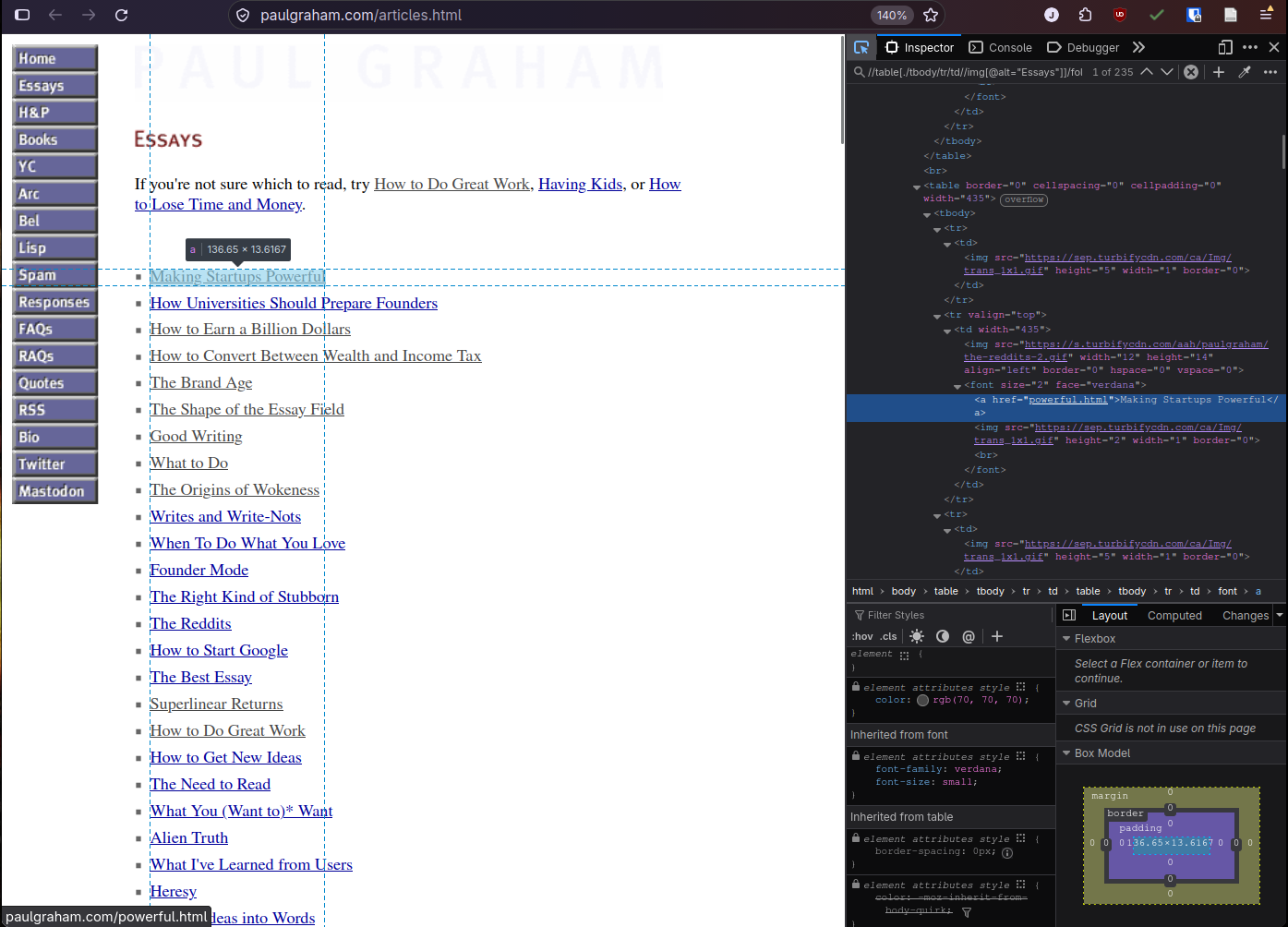
Wait, iterating over the essays? How dit that happen? Well, I pulled a little sneaky on you: XPath queries always return a node set rather than a node. It’s just that the other queries I showed all returned a set of length 1. Going back to our original example but looking higher in the tree, you can see that

/html/body/table/tbody/tr/td
will iterate through the columns of the layout table.
Testing
Ok, let’s plug this into our FreshRSS XPath feed and… What? We get an empty feed. To see why, let’s try a testing setup closer to what FreshRSS actually does in the backend. Let’s get the page source directly with curl and test the XPath query with xmllint:
$ curl -s https://paulgraham.com/articles.html |\
   xmllint --html --xpath '//table[./tbody/tr/td//img[@alt="Essays"]]/following-sibling::table[1]//td[./font]//a' -
XPath set is empty
Well, that’s not good. What happened? If you were to simply examine the HTML source returned by curl, you’d notice that there are actually no tbody elements in the page at all: Firefox (well, most browsers) itself inserts them into the DOM.
Let’s try again, this time removing the tbody requirement on the query:
$ curl -s https://paulgraham.com/articles.html |   \
    xmllint --html --xpath '//table[./tr/td//img[@alt="Essays"]]/following-sibling::table[1]//td[./font]//a' - |  \
    head
<a href="powerful.html">Making Startups Powerful</a>
<a href="prepare.html">How Universities Should Prepare Founders</a>
<a href="earn.html">How to Earn a Billion Dollars</a>
<a href="winc.html">How to Convert Between Wealth and Income Tax</a>
<a href="brandage.html">The Brand Age</a>
<a href="field.html">The Shape of the Essay Field</a>
<a href="goodwriting.html">Good Writing</a>
<a href="do.html">What to Do</a>
<a href="woke.html">The Origins of Wokeness</a>
<a href="writes.html">Writes and Write-Nots</a>
Success!
Using the browser console’s search functionality for testing XPath is awfully convenient , but be aware that modern browsers will show a corrected DOM in the console viewer . For example, you might end up with an extra tbody [3] in a table you were trying to query!
Hmm, we seem to have another problem though. The links in the <a> elements are relative. In the browser context, this serves us well, but for a feed entry we’ll need to have the absolute URL to the page entry, otherwise we’ll navigate to https://<your_freshrss_domain>/powerful.html. Unfortunately, XPath 1.0’s concat function only stringifies the first node of a node-set and cannot be used like a map to apply the prefix to the whole set.
The good news is we don’t need to. FreshRSS iterates over each matched item, and you can apply single-node expressions to each field. We can simply use the following construction get absolute URLs:
concat("https://paulgraham.com/", descendant::a/@href)
where descendant simply refers to an item in the set generated by our XPath query above.
And so we have it! We can now collect all of these queries and expressions into FreshRSS to get full feeds of Paul Graham’s essays, again!
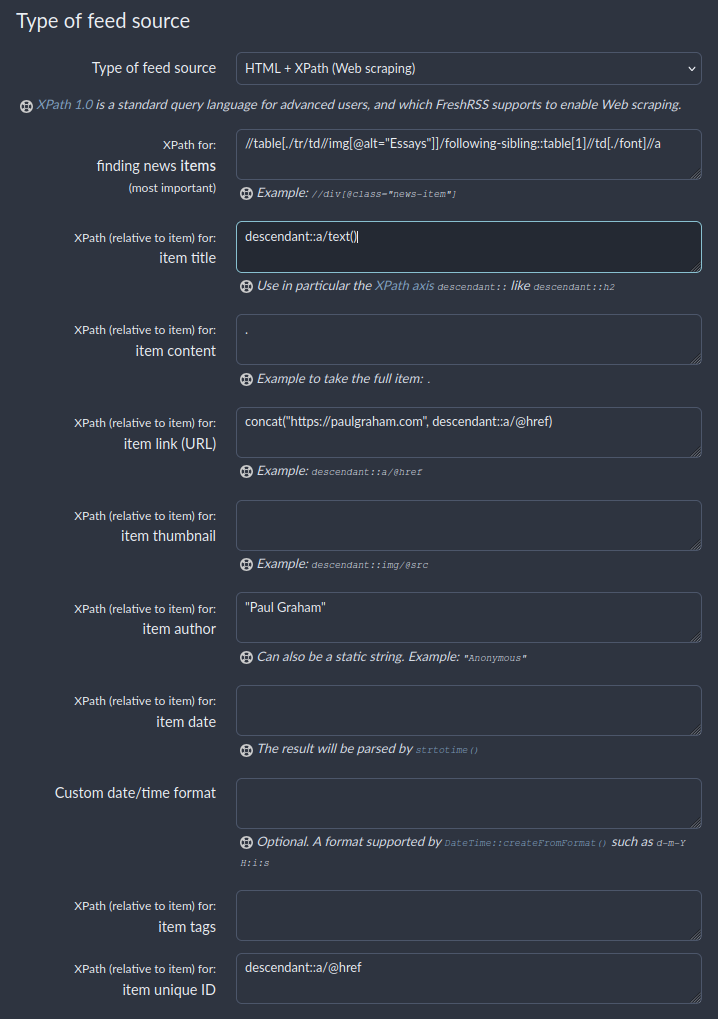
A lot of the fields remain empty, as Paul doesn’t provide a lot of metadata to parse in the Essays page. Specifically, there is no publication date metadata, the date only appears on the essay page itself as MMMM YYYY. Because this is on a different page, it is unfortunately outside the scope of XPath and would require custom site parsing to achieve. We are limited to a single page’s DOM with XPath.
Leaving the date field alone will make FreshRSS populate the date with the first time it sees the item though, which is probably good enough.
When scraping fails
We were relatively lucky here. Paul’s website is easy to query, does not require authentication, and does not (currently) employ any kind of bot protection. I’ve found that these last two are the most common failure points for web scraping.
On the backend, FreshRSS simply issues a GET request through libcurl to whatever website you point it at. It does not store cookies (by default) and does not (cannot) execute JavaScript. Its User-Agent is FreshRSS/<version>. This is simple, and works in virtually every case where a site willingly offers an RSS feed. But for websites that do not, addressing these failures modes can be quite daunting.
Authentication
Unfortunately, authentication is application dependent. Some sites will accept a simple username and password, which you can provide to FreshRSS when configuring your feed, others will have a way to generate a token which you can add to your HTTP headers, typically Authorization: Bearer <token>.
Any authentication that requires a JavaScript loop to set a cookie, unfortunately, won’t work. I’ve had some success simply replaying cookies in older enterprise applications by setting it in the “Use cookies when fetching the article content” section, but this does not always work.
JavaScript challenges
This is where the guidelines that I laid out at the start of the article about being considerate apply. A lot of sites now are forced to deploy bot protections to protect against aggressive AI scraping that rack up server bills. Scraping a website to generate feeds looks a lot like a bot trying to siphon away content, so we want to be as transparent as possible with our intention, and exercise restraint in our scraping frequency.
That said, I do think that scraping to generate personal RSS feeds is a valid way of using the Internet today. It grants me total control over the content that I see without algorithmic influence, and gives me a consistent UI for reading.
Most JavaScript challenges expect to communicate with a real browser with a known User-Agent string, a full JavaScript engine, capable of following redirects, settings cookies, all the modern web stuff. So what can we do to get FreshRSS to the data anyway? Well, we can use a headless browser. There are multiple ways of doing this. For my part, I have deployed trawl in my homelab to serve as a proxy for FreshRSS feeds that require a full browser to operate. It is deployed internally as http://proxy.<domain>:<port> and I direct FreshRSS to go through the proxy to fetch some feeds.
If you’re already into self-hosting, the setup is not too bad, but does require a self-signed cert for the TLS termination. Here’s some of my docker-compose setup for reference.
Conclusion
I’ve probably spent too much time making sure I can consume Internet content with RSS, and I hope that this will help you do the same! I’ve successfully used XPath to generate feeds from a dozen websites that decide not to offer RSS feeds, and it is always satisfying to see new articles showing up in my FreshRSS instance.
Thanks to Shane P. for reading a draft of this article.
Resources
- Dan Q, “XPath Scraping with FreshRSS”. Published on September 27, 2022. Accessed on September 28, 2025. (Cited: ↩1)
- C. Siebenmann, “We Need to Start Doing Web Blocking for Non-Technical Reasons”. Published on October 19, 2025. Accessed on October 24, 2026. (Cited: ↩1)
- CezarySzulc, “Answer to ‘Browser Inspector Adds Tbody to Table Not Present in Raw HTML’”. Published on August 23, 2021. Accessed on October 1, 2026. (Cited: ↩1)